
Published November 19, 2026 · by Anže Skodlar
A prompt library for lawyers: what to tell AI in everyday work
The five building blocks of a good prompt are the same for every question, but what goes into them depends on the work. For contract review, risk analysis, case file summaries, and version comparison, we set out what the tool needs to know.
A good prompt has five building blocks: role, context, input material, task, and format. When all of them are present, the answer is significantly better. Yet even knowing this, most lawyers build the instruction from scratch with every question.
The five building blocks are the same for every question, but what goes into each one depends on the work you're doing. In contract review, the key question is whose side you represent. In a case file summary, the key is that the tool separates the parties' allegations from established facts. In version comparison, you need to say which version is the baseline. These are details an experienced lawyer tells a trainee as a matter of course, but in a prompt they have to be written down.
Below are the four types of work lawyers encounter most often. For each, we set out when it comes into play and what the tool needs to know, organized by the five building blocks.
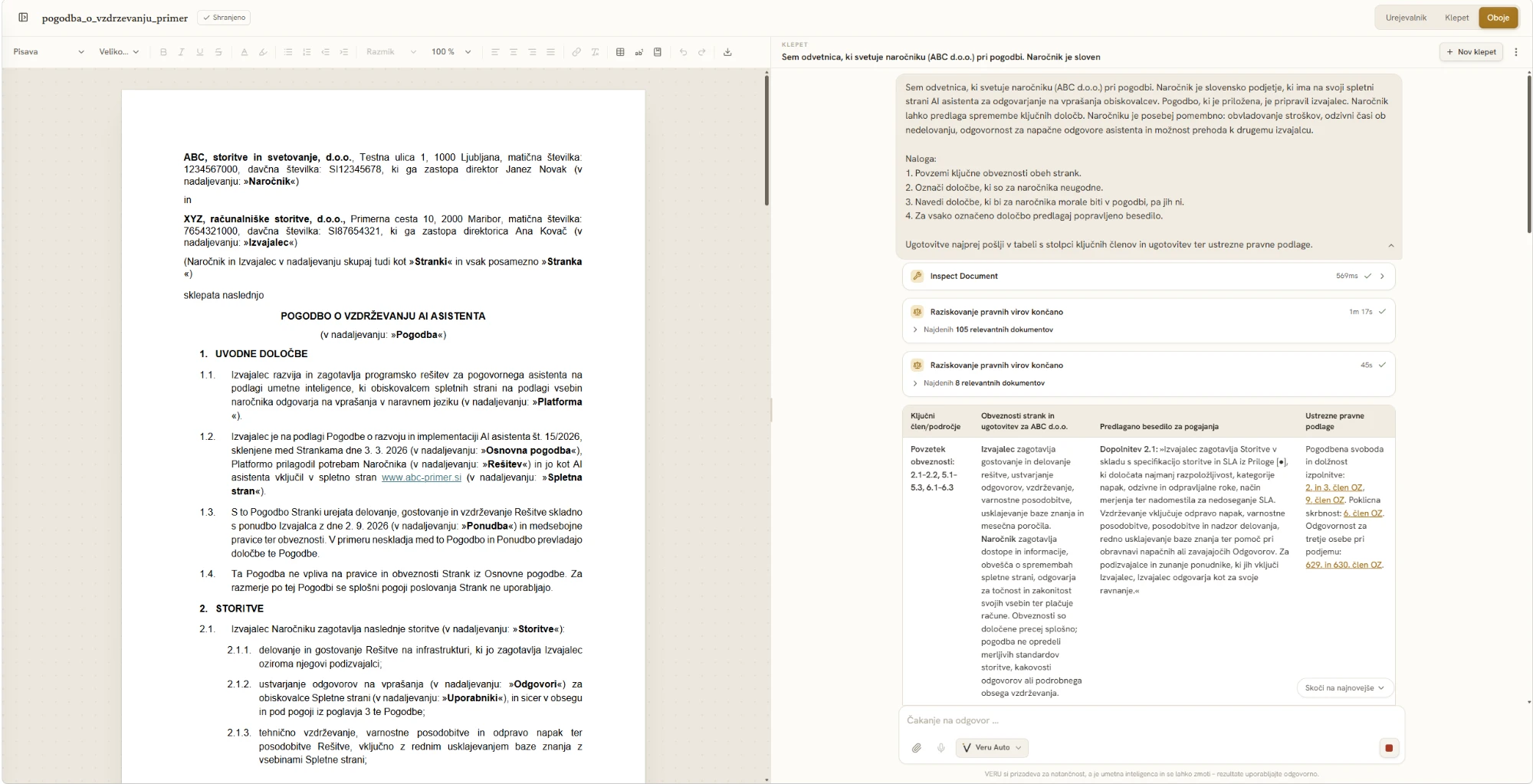
1. Contract review
Contract review is one of the most common tasks in a lawyer's everyday work. The client has received a draft contract from the other party and, before signing, needs an assessment of whether they can sign it and what needs to change.
What the tool needs to know:
- Role: whose side you represent. The same provision is favorable to one party and unfavorable to the other.
- Context: what the client wants to achieve with the contract, whether you can amend it or only accept or reject it, and what matters most to the client.
- Input material: the draft contract and, if one exists, the client's template or standard clauses. A review "against the law" and a review "against our standard" are two different tasks.
- Task: a summary of the key obligations, unfavorable provisions, missing provisions, and proposed amendments. The most expensive gaps are often precisely the ones that aren't in the contract.
- Format: a table of article / finding / legal basis / proposed amendment, with a source cited for each finding.
2. Risk analysis
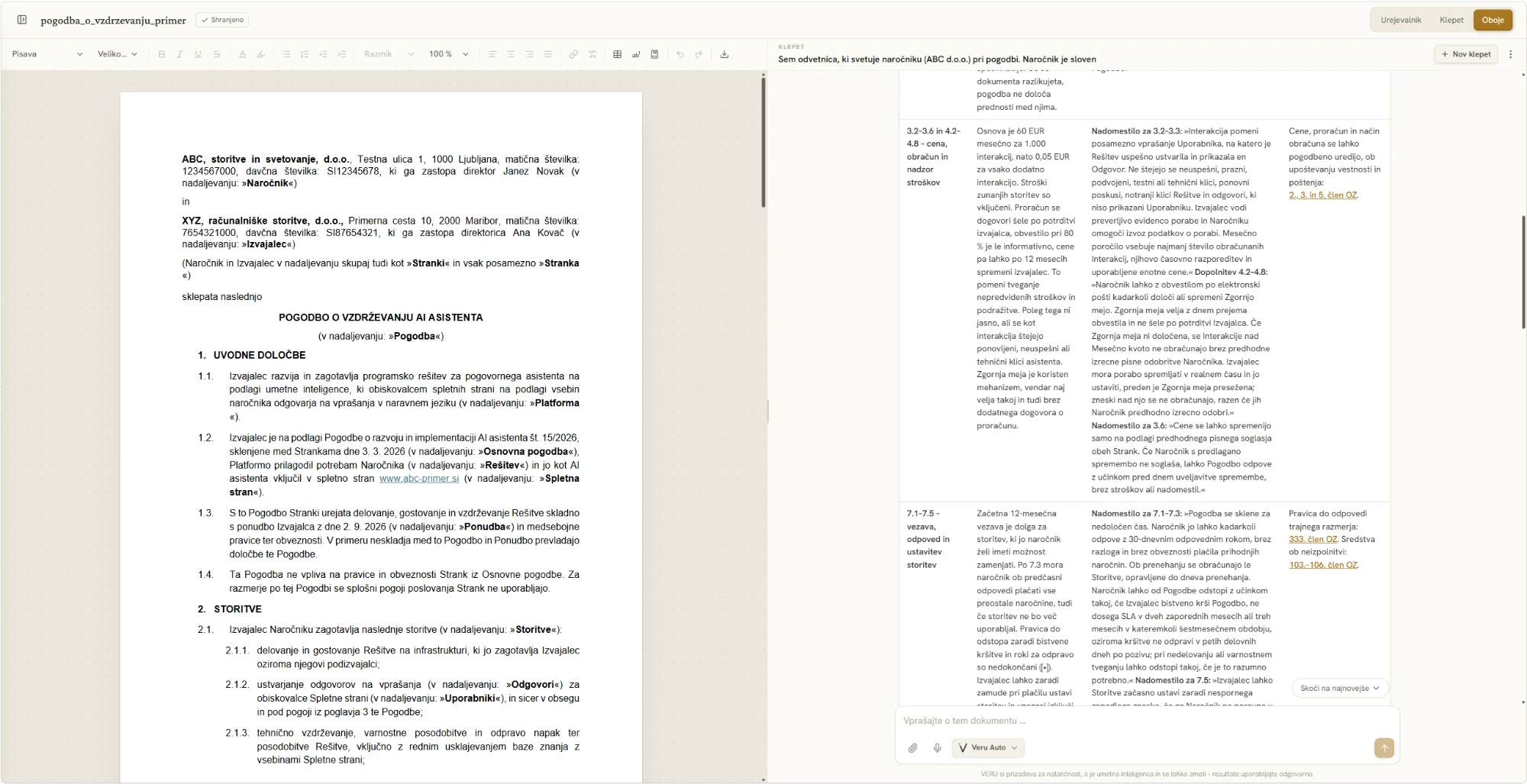
Risk analysis often follows on from contract review, but it answers a different question. The client wants to know not only whether the contract is fine, but also what could happen to them and how to protect against it. That's why it makes sense to ask it as a follow-up question in the same matter.
What the tool needs to know:
- Role: whom you're preparing the assessment for and ahead of which decision, such as signing, a transaction, or a filing.
- Context: what the client intends, the scale of the deal (value, duration, importance to the business), and what the client is worried about. The tool can assess whether a provision is enforceable. Whether the client can afford it depends on information you have to provide.
- Input material: the contract or deal documentation and, if one was done, the contract review.
- Task: identifying the risks, assessing each one, and a proposed measure (amending the contract, additional security, or accepting the risk). Also ask the tool to flag where the assessment rests on an assumption about facts that aren't evident from the material.
- Format: set a scale. Without one, you get adjectives ("significant," "minor") that can't be compared. For example: a table with separate ratings for likelihood and impact on a low / medium / high scale, with risks ranked from most serious down.
3. Case file summary
We need a case file summary when taking over a matter from a colleague, preparing for a hearing, or having ten minutes to brief a partner on a matter that runs to a hundred pages. What we need then isn't a shorter version of the file, but an overview of what is undisputed, what is disputed, and what is still open.
What the tool needs to know:
- Role: whom you represent and in what kind of proceedings.
- Context: the stage of the proceedings, the next step and deadline, and who the summary is for: internal use or the client.
- Input material: a list of the attached documents, ideally with dates. If the file is longer than the tool can process at once, summarize it in parts. A part the tool hasn't seen won't be noticeably missing from the summary; it will be missing silently.
- Task: a chronology, a separation of undisputed and disputed facts, both parties' arguments, and open questions. The parties' allegations aren't facts, so explicitly instruct the tool to distinguish who claims what.
- Format: a reference to the document, and ideally the page, for every statement. Add an instruction not to add facts that aren't in the material and to flag gaps explicitly.
4. Version comparison
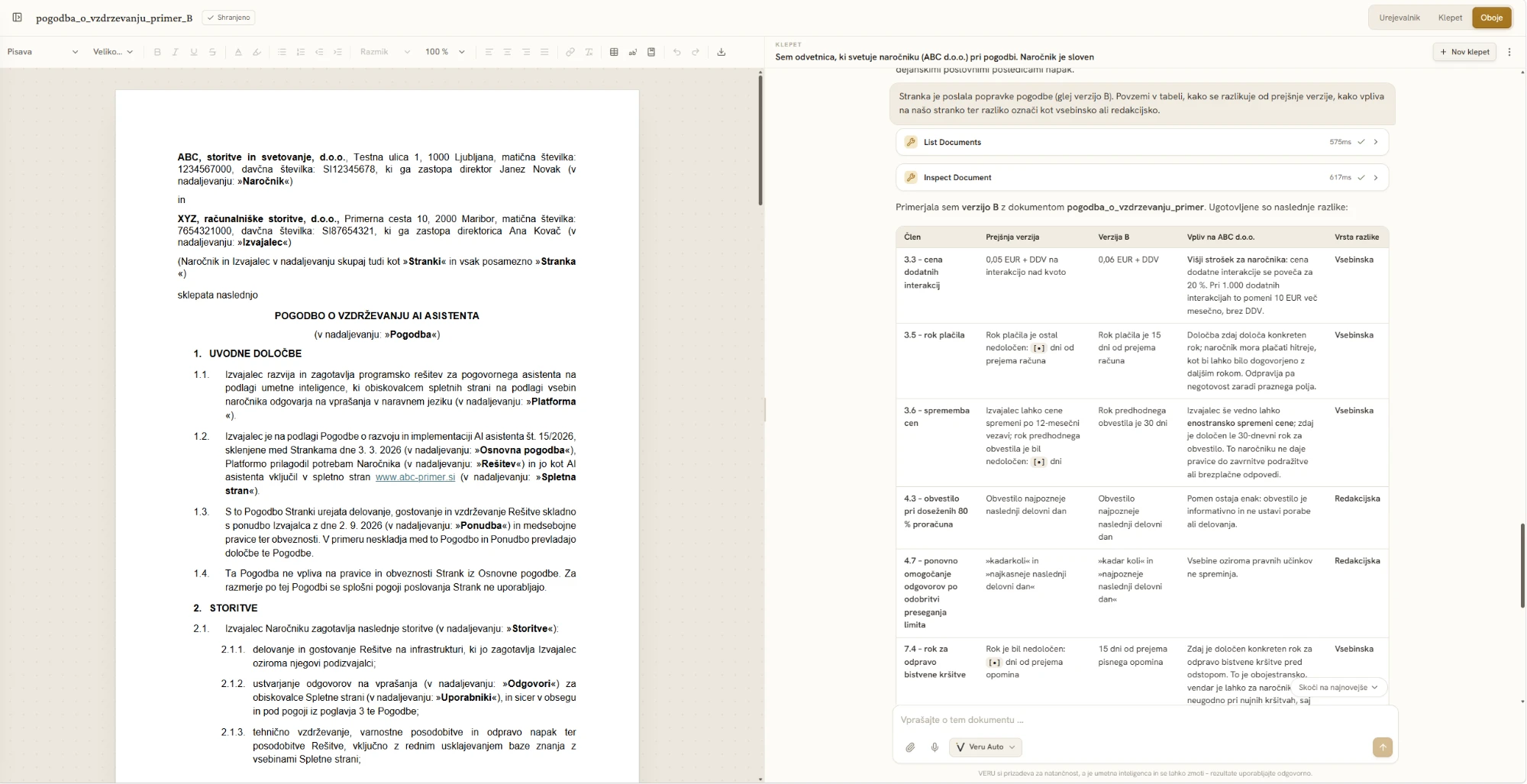
Version comparison is part of every contract negotiation. The other side sends back a revised draft, and the cover letter says it's "just a few drafting changes." The lawyer has to check whether that's true and what has actually changed in the text.
What the tool needs to know:
- Role: whose side you represent in the negotiations.
- Context: which version is yours and which was sent back, what has already been agreed in the negotiations, and what the other side lists as changes in its cover letter. Without a baseline, the tool doesn't know what is a change and what is the original text.
- Input material: both versions and the cover letter.
- Task: all differences, separated into substantive and drafting changes, and an assessment of how the substantive changes affect your client. Replacing "shall" with "may" is one word and a substantive change. Renumbering articles is many changes, none of them substantive. Often the most useful task is having the tool find the changes the cover letter doesn't mention.
- Format: a table of article / text before / text now / type of change / impact on the client, followed by a separate list of unannounced changes.
Rules that apply to all four
- One step per prompt. Ask for the contract review and the risk analysis one after the other in the same matter, not in a single question.
- Require sources in the format, don't hope for them. The sentence "cite a source for each finding" is part of the instruction, not a courtesy.
- Allow the answer "I don't know." Add an instruction for the tool to say explicitly when there is no source or information. For a lawyer, that answer is often worth more than a convincingly filled gap.
- The first answer is a starting point. Build on it with follow-up questions, as you would with a colleague.
What Veru does differently
These instructions work with any tool. The difference is how much of them you have to write again every time.
In Veru, every matter runs in its own workspace. The contract, earlier versions, correspondence, and findings so far stay there. So you write the "context" and "input material" building blocks once, and for follow-up questions what remains is role, task, and format. The risk analysis thus builds on the contract review without uploading the contract again. You can also keep your firm's standard clauses and internal guidelines with the matter, to serve as the benchmark during review.
Every finding comes with a citation to a source that can be opened and read. Proposed amendments and version comparisons are created in the document editor, where you also edit the contract.